Wednesday, July 08, 2026

Is High Quality Software Worth the Cost?

I can't agree more with Martin Fowler's post on "Is High Quality Software Worth the Cost?".

Here is just a repost.

https://martinfowler.com/articles/is-quality-worth-cost.html

A common debate in software development projects is between spending time on improving the quality of the software versus concentrating on releasing more valuable features. Usually the pressure to deliver functionality dominates the discussion, leading many developers to complain that they don't have time to work on architecture and code quality.

Betteridge's Law of headlines is an adage that says any article with a headline or title that ends in a question mark can be summarized by “no”. Those that know me would not doubt my desire to subvert such a law. But this article goes further than that - it subverts the question itself. The question assumes the common trade-off between quality and cost. With this article I'll explain that this trade-off does not apply to software - that high quality software is actually cheaper to produce.

Although most of my writing is aimed at professional software developers, for this article I'm not going to assume any knowledge of the mechanics of software development. My hope is that this is an article that can be valuable to anyone involved with thinking about software efforts, particularly those, such as business leaders, that act as customers of software development teams.

We are used to a trade-off between quality and cost

As I mentioned in the opening, we are all used to a trade-off between quality and cost. When I replace my smart phone, I can choose a more expensive model with faster processor, better screen, and more memory. Or I can give up some of those qualities to pay less money. It's not an absolute rule, sometimes we can get bargains where a high quality good is cheaper. More often we have different values to quality - some people don't really notice how one screen is nicer than another. But the assumption is true most of the time, higher quality usually costs more.

Software quality means many things

If I'm going to talk about quality for software, I need to explain what that is. Here lies the first complication - there are many things that can count as quality for software. I can consider the user-interface: does it easily lead me through the tasks I need to do, making me more efficient and removing frustrations? I can consider its reliability: does it contain defects that cause errors and frustration? Another aspect is its architecture: is the source code divided into clear modules, so that programmers can easily find and understand which bit of the code they need to work on this week?

These three examples of quality are not an exhaustive list, but they are enough to illustrate an important point. If I'm a customer, or user, of the software, I don't appreciate some of the things we'd refer to as quality. A user can tell if the user-interface is good. An executive can tell if the software is making her staff more efficient at their work. Users and customers will notice defects, particularly should they corrupt data or render the system inoperative for a while. But customers and users cannot perceive the architecture of the software.

I thus divide software quality attributes into external (such as the UI and defects) and internal (architecture). The distinction is that users and customers can see what makes a software product have high external quality, but cannot tell the difference between higher or lower internal quality.

At first glance, internal quality does not matter to customers

Since internal quality isn't something that customers or users can see - does it matter? Let's imagine Rebecca and I write an application to track and predict flight delays. Both our applications do the same essential function, both have equally elegant user interfaces, and both have hardly any defects. The only difference is that her internal source code is neatly organized, while mine is a tangled mess. There is one other difference: I sell mine for $6 and she sells hers for $10.

Since a customer never sees this source code, and it doesn't affect the operation of the app, why would anyone pay an extra $4 for Rebecca's software? Put more generally this should mean that it isn't worth paying more money for higher internal quality.

Another way I put this is that it makes sense to trade cost for external quality but it makes no sense to trade cost for internal quality. A user can judge whether they want to pay more to get a better user interface, since they can assess whether the user interface is sufficiently nicer to be worth the extra money. But a user can't see the internal modular structure of the software, let alone judge that it's better. Why pay more for something that has no effect? Since that's the case - why should any software developer put their time and effort into improving the internal quality of their work?

Internal quality makes it easier to enhance software

So why is it that software developers make an issue out of internal quality? Programmers spend most of their time modifying code. Even in a new system, almost all programming is done in the context of an existing code base. When I want to add a new feature to the software, my first task is to figure out how this feature fits into the flow of the existing application. I then need to change that flow to let my feature fit in. I often need to use data that's already in the application, so I need to understand what the data represents, how it relates to the data around it, and what data I may need to add for my new feature.

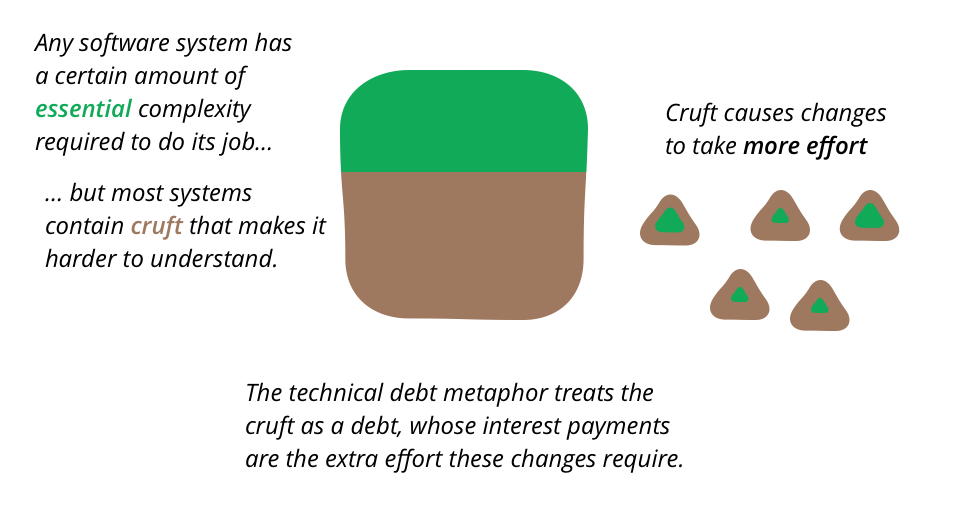
All of this is about me understanding the existing code. But it's very easy for software to be hard to understand. Logic can get tangled, the data can be hard to follow, the names used to refer to things may have made sense to Tony six months ago, but are as mysterious to me as his reasons for leaving the company. All of these are forms of what developers refer to as cruft - the difference between the current code and how it would ideally be.

One of the primary features of internal quality is making it easier for me to figure out how the application works so I can see how to add things. If the software is nicely divided into separate modules, I don't have to read all 500,000 lines of code, I can quickly find a few hundred lines in a couple of modules. If we've put the effort into clear naming, I can quickly understand what the various part of the code does without having to puzzle through the details. If the data sensibly follows the language and structure of the underlying business, I can easily understand how it correlates to the request I'm getting from the customer service reps. Cruft adds to the time it take for me to understand how to make a change, and also increases the chance that I'll make a mistake. If I spot my mistakes, then there's more time lost as I have to understand what the fault is and how to fix it. If I don't spot them, then we get production defects, and more time spend fixing things later.

My changes also affect the future. I may see a quick way to put in this feature, but it's a route that goes against the modular structure of the program, adding cruft. If I take that path, I'll make it quicker for me today, but slow down everyone else who has to deal with this code in future weeks and months. Once other members of the team make the same decision, an easy to modify application can quickly accumulate cruft to the point where every little change takes many weeks of effort.

Customers do care that new features come quickly

Here we see a clue of why internal quality does matter to users and customers. Better internal quality makes adding new features easier, therefore quicker and cheaper. Rebecca and I may have the same application now, but in the next few months Rebecca's high internal quality allows her to add new features every week, while I'm stuck trying chop through the cruft to get just a single new feature out. I can't compete with Rebecca's speed, and soon her software is far more featureful than mine. Then all my customers delete my app, and get Rebecca's instead, even as she's able to increase her price.

Friday, November 01, 2024

Be A Developer That Uses AI

Developers will not be replaced by AI, they'll be replaced by developers that use AI.

Generative AI tools are revolutionizing the way developers work. According to McKinsey, these tools can significantly speed up common tasks:

  • Documenting Code: Tasks that typically take hours can be completed in half the time.
  • Writing New Code: Developers can write new code nearly twice as fast.
  • Optimizing Existing Code: Code optimization can be done in nearly two-thirds the time it usually takes.
  • A study by Microsoft emphasizes the value of deep work for developers. Devs who have dedicated time for uninterrupted work report feeling 50% more productive.
Improving the overall developer experience has a direct impact on productivity. McKinsey found that a better developer experience can lead to a 20-30% reduction in customer-reported product defects and a 20% improvement in employee experience scores. 


    Wednesday, August 07, 2024

    10 Takeaways for GitHub Copilot

    Having used AI tool GitHub Copilot for a year, I realized that learning GitHub Copilot is like learning any software. The more you use it, the better you will be. Overall, my experience with GitHub Copilot was very positive. GitHub Copilot helped me boost my productivity and happiness of the software development. 

    Here are a few tips to become a better software developer boosted by GitHub Copilot or any Artificial Intelligence tools.

     Tips

    • Open the relevant files.
    • Provide specific comments.
    • Reference code using #file.
    • Generate model class from the database.
    • Generate multiple classes in one prompt.
    • Write the prompt incrementally.
    • Reuse previous prompts. Give specific instructions.
    • Don't start a new session. Previous prompts will be gone.
    • Don't expect AI gives you the same result every time.
    • Double check the result. GitHub Copilot could have bugs.
    • Generate the commit description with GitHub Copilot.
    • Generate the PR description with GitHub Copilot
    • Explain the commit with GitHub Copilot
    • Explain the PR with GitHub Copilot
    • Suggest the fix from GitHub Copilot
    • Fix the unit tests related to the recent changes using GitHub Copilot

     Verdict

    GitHub Copilot is easy to use in Visual Studio. It’s a delight to see Copilot’s suggestions. The time saved for the developers justifies the cost. GitHub Copilot and Jetbrains Resharper are complementary to each other. GitHub Copilot is better than Jetbrains Resharper in code auto-generating. GitHub Copilot can’t replace Jetbrains Resharper in areas such as live templates, code refactoring, and code navigation.

    • Increase developer productivity 
    • Increase developer happiness
    • Accelerate software development
    • Remain in your flow in the beloved editor (VS or VSCode)


    Sunday, August 04, 2024

    C# From-The-End Index Operator ^ C# 13

    Implicit index access

    With C# 13, the implicit “From-The End” index operator ^ can now be used in object initializers. You can use ^ to specify a position in a collection that is relative to the end of the collection.

    For example, consider the following class.

    class InitializerDemo
    {
        public int[] integers { get; set; } = new int[5];
    }

    You can now use the following piece of code in C# 13 to take advantage of the index operator.

    var arr = new InitializerDemo
    {
        integers =
        {
            [0] = 100,
            [^1] = 1000
        }
    };

    When you execute the above program, arr.Integers[0] will have the value 100 while arr.Integers[4] will have the value 1000. 

    C# Partial Properties C# 13

    Partial properties

    Partial properties, like partial methods, are a new feature added in C# 13. They support source generators and are used to separate the declaration of a property from its implementation code. Note that partial methods were introduced earlier and gained some traction in C# 9.

    The following code snippet illustrates how partial properties can be used:

    partial class MyClass
    {
        string myField;
        public partial string MyProperty { get; set; }
        public partial string MyProperty
        { get => myField; set => myField = value; }
    }

    It should be noted that when you declare a partial property with accessors having semicolon bodies without any implementation code inside, it is assumed to be a defining declaration. By contrast, when a partial property has accessors that contain implementation code, it is considered to be an implementing declaration.

    Partial properties are used to provide support for source generators. Their sole purpose is to isolate the declaration of a property from its implementation code.

    C# Using ref and unsafe in async methods and iterators C# 13

     Using ref and unsafe in async methods and iterators

    Before C# 13, declaring local ref variables or local variables of a ref struct type in either async methods or methods that use yield return, commonly known as iterator methods, was not possible. Nor could these methods have an unsafe context. C# 13 allows the declaration of ref local variables and local variables of a ref struct type in asynchronous methods. Similarly, C# 13 allows unsafe contexts in iterator methods.

    You can also safely use types like System.ReadOnlySpan<T> in asynchronous and iterator methods. 

    The primary benefit of using a ref struct is to get the benefit of pointers in a safe context and prevent memory allocation in several common scenarios. Hence, by using ref struct types in async methods and iterators, you can improve the performance of your application. This is the most useful new feature in C# 13 in my opinion.

    C# 13 allows you to make a type argument a ref struct by specifying allows ref struct in the where clause of the type parameter. Note that if you use a type parameter specified with allows ref struct, then you are including all of the behaviors and restrictions of the ref struct type.

    Consider the following piece of code that shows a ref struct and a method that uses it as a parameter.

    ref struct TestStruct
    {

    }

    TestStruct TestMethod<TestStruct>(TestStruct p)
        where TestStruct : allows ref struct
        => p;

    The following code snippet illustrates how ref struct instances can be created and used inside an async method.

    async Task<int> Test()
    {
        TestStruct testStruct = new TestStruct();
        TestMethod(testStruct);
        return await Task.FromResult(0);
    }

    C# New Lock Object C# 13

    New Lock object

    .NET 9 introduces a new thread synchronization type called System.Threading.Lock, which provides enhanced thread synchronization capabilities. Note that the runtime will detect whether the target of a lock is a Lock object, in which case it will use the updated API in lieu of the traditional API that uses System.Threading.Monitor. The compiler also will recognize if you convert a Lock object to some other type where System.Threading.Monitor code would be generated.

    Let’s compare the old and new APIs. The code snippet below implements synchronization using the traditional API.

    public class DbManager
    {
        private object objLock = new object();
        public void InsertData()
        {
            lock (objLock)
            {
                //Your usual code to insert data to the database
            }
        }
    }

    To use the new API, you need to change only one line of code:

    private System.Threading.Lock objLock = new System.Threading.Lock();

    Hence, the updated DbManager class would have the following code.

    public class DbManager
    {
        private System.Threading.Lock objLock = new System.Threading.Lock();
        public void InsertData()
        {
            lock (objLock)
            {
                //Your usual code to insert data to the database
            }
        }

    } 

    Is High Quality Software Worth the Cost?

    I can't agree more with Martin Fowler's post on "Is High Quality Software Worth the Cost?". Here is just a repost. https:/...